
Grims JukeBoxes adds owner-bound portable music players, speaker networks built from ordinary blocks, and the Werks Big Jukebox. It needs Paper 26.3 and Java 25. Geyser and Floodgate (for Bedrock) and Packforge (for the Java art) are optional. Everything is stored in SQLite at plugins/GrimsJukeBoxes/jukeboxes.db.
Before upgrading. Back up your devices, playlists and placed Big Jukeboxes before replacing an installed version.
Admin wiki
Installation
What's in the bundle
| File | Goes to |
|---|---|
plugins/GrimsJukeBoxes-0.0.9.jar | plugins/ |
The bundled grimsjukeboxes and gjb_reskin content folders | Install both in Packforge: the devices and Big Jukebox, plus the workshop jukebox appearance. |
The bundled merged note_block.json | Use the matching combined blockstate file; avoid installing competing copies. |
resource-packs/bedrock/GrimsJukeBoxes-Bedrock-0.0.9.mcpack | plugins/Geyser-Spigot/packs/ |
geyser/GrimsJukeBoxes-Geyser-Mappings-0.0.8.zip | Extract grimsjukeboxes_blocks.json and grimsjukeboxes_items.json directly into plugins/Geyser-Spigot/custom_mappings/. |
| The standalone Java resource-pack ZIP | For manual resource-pack hosting. Avoid loading duplicate copies of the same artwork. |
One more pack shows up on its own: at every server start the plugin writes GrimsJukeBoxes-FollowSounds.mcpack into plugins/Geyser-Spigot/packs/. It is not in the bundle and needs no install. See The follow-sound pack.
Steps
- Stop the server. Back up
plugins/GrimsJukeBoxes,plugins/Packforge/contents, andplugins/Geyser-Spigot. - Put the jar in
plugins/, and remove any older Grims JukeBoxes jar. - Install the current
grimsjukeboxesandgjb_reskincontent folders in Packforge. Remove the olderegw_jukeboxreskin if present;gjb_reskinreplaces it. - Big Jukebox on Java: the Big Jukebox shares Minecraft's note block with Grims Crops. The merged
note_block.jsonreplaces the one in the Grims Crops folder, and there must be exactly onenote_block.jsonundercontents. It's built for a specific Grims Crops release.README-NOTE-BLOCK.txtnext to it names the release and shows how to check yours. Redo this step after every Grims Crops install or update. - Put the Bedrock pack in
plugins/Geyser-Spigot/packs/, keeping only one Grims JukeBoxes pack there. Keep your music disc packs where they are. Put both mapping files directly incustom_mappings/, with no backup.jsoncopies in any subfolder. Keepgameplay.enable-custom-content: truein Geyser'sconfig.yml. The follow-sound pack needs no install: the plugin writes it at the next start. - Start the server with a full restart, because
/geyser reloaddoesn't reload mappings. Then run/pf zipand/pf push all. - Check the console. Geyser starts with no
Error in registering blocksorUnknown Java block state. Grims JukeBoxes logsBedrock follow sounds: …for the custom disc packs it found, thenBedrock Walkmans follow their player for … discs, with no warning that packs share a UUID.
Use functional plugin items. Pack-host give commands create artwork items. Use the JukeBoxes recipes or /gjb give for working devices.
Install the matching Crops and JukeBoxes artwork together for the Big Jukebox’s Java appearance.
Upgrading from 0.0.6 or 0.0.7
Only the plugin changed. The resource packs, the Geyser mappings and the merged note_block.json are the same as in 0.0.6.
- Stop the server. Back up
plugins/GrimsJukeBoxes. - Replace the old jar with
plugins/GrimsJukeBoxes-0.0.9.jarfrom the bundle. - Leave every pack where it is. The bundle's packs are named
0.0.8, but their content is the same as the0.0.6files already installed, so nothing needs replacing and players download nothing new. - Start the server. Test Java first, then Bedrock.
Coming from 0.0.5 or older, follow the steps above instead. The Big Jukebox block models and the Bedrock pack did change in 0.0.6, and the merged note_block.json from 0.0.5 stays where it is.
Admin wiki
Commands
The main command is /grimsjukeboxes, alias /gjb.
| Command | Who | What it does |
|---|---|---|
/gjb give <player> walkman|teemos_walkman|mp3|walkman_voucher|big_jukebox [amount] | Admin | Gives a device, a Walkman Voucher or a Big Jukebox. Portable players are owner-bound, and only one per player works at a time: the new one replaces the old, which becomes a keepsake, and takes over its discs. Each Big Jukebox item has its own ID; [amount] gives that many separate items. |
/gjb unlink | Player | Removes your own speaker network without breaking any blocks. |
/gjb unlink <online-player> | Admin | Removes another player's network. |
/gjb info | Player | Inspects the held device or the targeted jukebox. On a Big Jukebox it shows, for example, Big Jukebox | facing EAST | 3/45 tracks | ORDERED | playing. A replaced device shows as replaced, keepsake. |
/gjb reload | Admin | Reloads the safe runtime settings (see Configuration). |
Teemo's Walkman and the Big Jukebox have no recipe, so /gjb give is the only way to get them. There is no Speaker item or recipe: linking turns an existing block into a speaker.
Walkman Vouchers
A reward item for vote crates that turns into a Walkman. Giving it needs grimsjukeboxes.admin, which the console has, so a crate plugin hands one out with a console reward command:
gjb give %player% walkman_voucher 1Use your crate plugin's own player placeholder (%player%, {player}, <player> and so on) and leave out the leading / if it asks for commands without one.
- The item. A paper with the enchantment glint, named
Walkman Voucher, with the loreRight-click to redeem a Walkman.andReplaces your current music player; your discs move to it.It has no custom art, so no pack changes are needed. - Vouchers never stack. The item's maximum stack size is 1, so every voucher takes its own slot in the inventory, chests, shulker boxes and hoppers, two dropped vouchers stay two items when picked up, and a crafting grid slot holds only one.
- Amount.
[amount]is 1 to 64, default 1. The command gives that many separate vouchers, one per slot, and the ones that don't fit in the inventory drop at the player's feet. - Redeeming needs
grimsjukeboxes.use. Right-click with a voucher in either hand, in the air or on a block. One click redeems only the voucher in the hand used, even with a voucher in each hand, and holding right-click down redeems just that one. - What it gives. A Walkman bound to that player, exactly as
/gjb give <player> walkmanwould. It becomes their active music player, their saved discs move to it, and the old player becomes a keepsake. Discs past the Walkman's 9 slots are given back to the player, so nothing is lost. - If it fails. When the Walkman can't be saved, the voucher is returned and the old player stays active with all its discs. Its song has stopped, so the player presses Play again.
- Old vouchers. Vouchers given by 0.0.7 keep working. A stack of them stays a stack and redeems one voucher per click, and new vouchers never join it.
It is still paper to Minecraft. Any crafting recipe or villager trade that takes paper will use a voucher up. Only the plugin's hidden tag makes a voucher, so a paper renamed Walkman Voucher in an anvil does nothing.
Replaced devices are keepsakes
When a player gets a new music player, from a voucher, /gjb give or crafting, the older one is no longer deleted from inventories and containers. It becomes a keepsake: it never opens and never plays again, and says so when used. The plugin adds the lore line Replaced: keepsake when it next sees the item, and /gjb info reports it as replaced, keepsake.
- Keepsakes stay wherever they are kept: inventories, ender chests, chests, barrels, shulker boxes, bundles, item frames, shelves, armor stands and any other holder.
- Only a keepsake lying on the ground as a dropped item is removed, when its chunk loads. Devices that were never issued are still removed wherever they are found.
- A crafted Walkman or MP3 Player that still shows
Loading albumswhen a newer player replaces it becomes a keepsake too. Before 0.0.7 that copy was deleted.
Admin wiki
Permissions
| Permission | Default | Allows |
|---|---|---|
grimsjukeboxes.use | true | Using portable players, Big Jukeboxes, linked jukeboxes, and linking, and redeeming Walkman Vouchers. |
grimsjukeboxes.craft | true | The Walkman and MP3 upgrade recipes. |
grimsjukeboxes.speakers.1 | true | Linking one speaker. |
grimsjukeboxes.speakers.2 – .4 | false | Linking two to four speakers. |
grimsjukeboxes.speakers.5 | op | Linking five speakers. |
jukebox.big.add | false | Adding discs to a Big Jukebox playlist. |
grimsjukeboxes.admin | op | Giving items, Walkman Vouchers included, unlinking another player's network, and reloading. /gjb info itself is open to players. |
A player's speaker limit is the highest grimsjukeboxes.speakers.N they have, capped by linking.max-speakers. The primary jukebox doesn't count toward it.
Admin wiki
Configuration
All settings live in plugins/GrimsJukeBoxes/config.yml.
| Setting | Default | What it does |
|---|---|---|
linking.timeout-seconds | 30 | How long linking mode stays on after sneak-using a jukebox. |
linking.max-axis-distance | 32 | How far a speaker may be from its jukebox on each of X, Y, and Z. 32 gives a 65 × 65 × 65 area centered on the jukebox. |
linking.max-speakers | 5 | The server-wide ceiling on speakers per network. |
playback.big-jukebox-volume | 100 | Big Jukebox loudness, as a percent of a normal jukebox. |
playback.linked-jukebox-volume | 100 | A normal jukebox's loudness while it's linked. |
playback.speaker-volume | 100 | Every linked speaker's loudness. |
playback.bedrock-walkman-sound | record | How Bedrock players hear their own portable player: record, ui, or off (see Bedrock). |
playback.audit-period-ticks | 10 | How often playback and speakers are checked. Restart required. |
menus.duplicate-confirm-seconds | 5 | How long a player has to confirm adding a duplicate song. |
recipes.enabled | true | Turns the Walkman and MP3 upgrade recipes on or off together. |
cleanup.chunks-per-tick | 1 | How fast stale devices are cleaned up as chunks load. Restart required. |
cleanup.scan-container-items | true | Also check items stored in containers. Restart required. |
placeholders.* | see file | The carrier materials and item models for the Walkman (CLOCK), Teemo's Walkman (CLOCK), and MP3 Player (ECHO_SHARD), plus the Big Jukebox icon. Changing one also needs matching Java and Bedrock, and Geyser art, and doesn't reskin existing items. |
The cleanup worker keeps keepsakes wherever they are stored. It removes only devices that were never issued and keepsakes lying on the ground as dropped items.
Volume and reach
A record at 100 reaches about 64 blocks, 50 about 32, and 25 or lower about 16 (and is quieter below 25). Turning the jukebox and speakers down shortens how far each one reaches, so neighboring sources overlap less.
What /gjb reload applies
Volume, the Bedrock Walkman sound, linking, the duplicate warning, recipes, and placeholder settings for items created afterward. It also re-checks Geyser's packs folder to see which follow sounds exist, but it never rewrites GrimsJukeBoxes-FollowSounds.mcpack: only a restart does that. New volumes apply to the next song that starts. The audit period and both cleanup settings need a restart.
Admin wiki
Big Jukebox
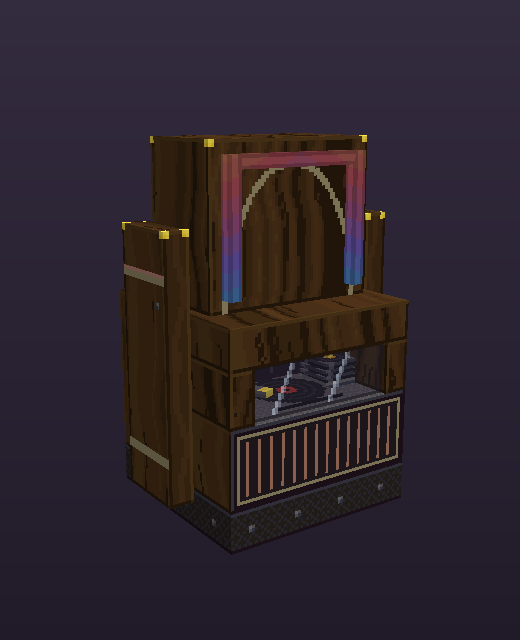
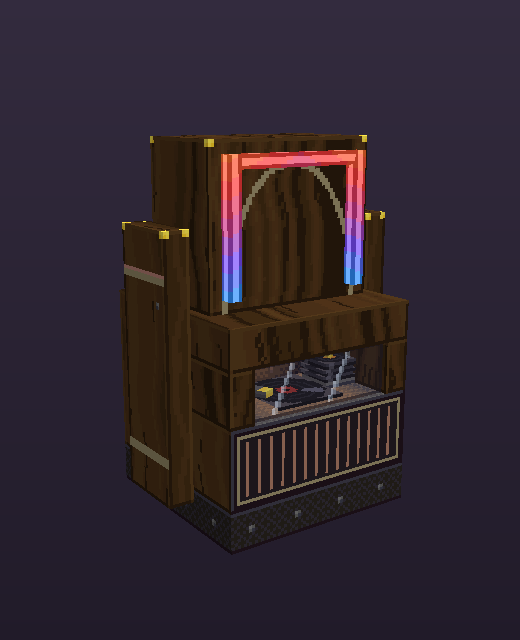
- Issue it with
/gjb give <player> big_jukebox [amount]. The item is a note block with the jukebox icon, and each item can be placed once. - Two blocks. It's a note block with an invisible barrier above it. The space above must be empty air when it's placed. Hoppers and dispensers never reach its playlist.
- Playlist: 45 discs in a 54-slot menu, ordered or shuffle. Adding a disc by using it on the jukebox needs
jukebox.big.add. The owner or an admin can arrange and remove tracks. - Breaking: only the owner or an admin, and only once it's empty. Break the cabinet; the barrier goes with it. A Big Jukebox holding tracks survives explosions.
- Looks:
Stop, the end of the playlist, and breaking it go idle at once. A server stop leaves every cabinet idle, and a chunk saved mid-song is corrected when it loads.
Light demos
This release includes three demo Big Jukeboxes for choosing how brightly a playing Big Jukebox lights its surroundings on Bedrock. They are real Big Jukeboxes: the playlist, controls, and linking all work.
| Give type | Bedrock light while playing |
|---|---|
big_jukebox | 8 |
bigjuke_v1 | 8, the same as the standard one |
bigjuke_v2 | 11 |
bigjuke_v3 | 15, for comparison only |
Java looks the same for all four, because a block model can't light the area on Java, so there the glow is drawn into the cabinet. Once a level is picked, a later build folds the demos into the standard Big Jukebox. Placed demos convert by themselves. Throw away any unplaced demo items before installing that build.
Admin wiki
Bedrock
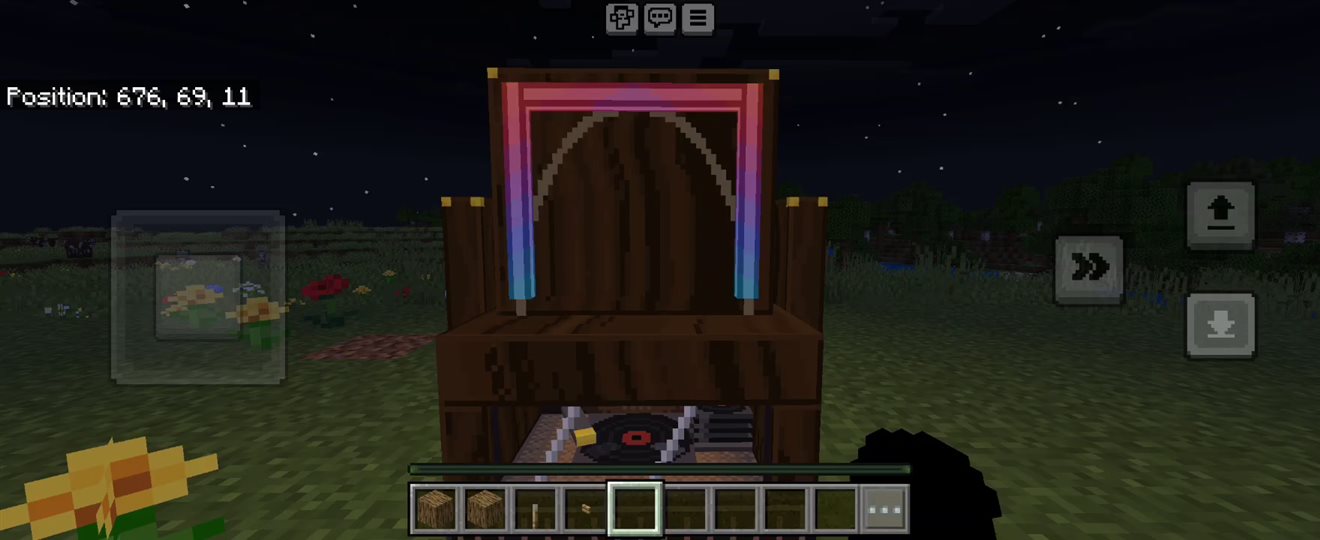
Walkman sound on Bedrock
Through Geyser, a song attached to a player stays where it started and fades out about 64 blocks away. So for a Bedrock (Floodgate) player's own Walkman, Teemo's Walkman, or MP3 Player, the plugin plays a non-positional copy of the disc that follows them however far they go, and Stop and Next work the same way. playback.bedrock-walkman-sound picks the copy:
record(default) uses Bedrock's Jukebox/Note Blocks volume slider.uiuses Bedrock's UI sound category. Try it if a song still fades as a Bedrock player walks away, then run/gjb reloadand start a new song.offplays the plain disc sound.
The Grims JukeBoxes Bedrock pack has copies for the 22 vanilla discs and the EGW, crow, and gmd discs. The plugin makes the copies for every other custom disc itself, in the follow-sound pack below, so every disc pack on the server follows its player. A disc neither pack covers still plays, but it fades out about 64 blocks from where it started. The console logs how many discs follow at startup and on reload.
The follow-sound pack
At each server start, with Geyser installed and playback.bedrock-walkman-sound not off, the plugin reads the music disc packs in plugins/Geyser-Spigot/packs and writes GrimsJukeBoxes-FollowSounds.mcpack into that same folder, before Geyser loads it on that same start.
- Nothing to install by hand. Add a disc pack, restart once, and its discs follow.
/geyser reloadalone doesn't cover a new pack; the next restart does. - A disc counts when a
.mcpackor.zipin that folder defines its sound asnamespace:namein therecordcategory, with the audio file in the same pack. EGW Port Studio 3D disc packs (crw,tst) work this way. Discs another pack already covers, like the EGW, crow, and gmd discs, are left to that pack. - The console logs
Bedrock follow sounds: 15 custom discs (crw, tst) in plugins/Geyser-Spigot/packs/GrimsJukeBoxes-FollowSounds.mcpack; Geyser loads it on this start.with your own count and namespaces. It ends with(unchanged)when the discs are the same as last time. ThenBedrock Walkmans follow their player for N discs …counts every disc that follows. - The file carries no audio, so it is small. It changes only when the discs change, and each change gets a new pack version, so Bedrock players download it once more.
- Leave it in
packs/and keep no second copy of it there. It carries no textures, so it never conflicts with the art packs. - Encrypted packs (with a
.keyfile beside them) and packs Geyser downloads from a URL can't be read, so their discs keep the plain sound. The console names an encrypted pack. - If you remove Grims JukeBoxes, delete
GrimsJukeBoxes-FollowSounds.mcpacktoo. Left behind it is harmless.
The Bedrock pack
- Every version uses the same pack UUID, so keep exactly one
GrimsJukeBoxes-Bedrockpack inpacks/. The console warns if there are two. The0.0.6,0.0.7and0.0.8files are the same pack, so any one of them is fine. - The pack carries the workshop jukebox look, including Vibrant Visuals maps. Delete the old standalone
EGW-Jukebox-Bedrockpack if it's still there. - The Big Jukebox glass is clear on Bedrock, with a thin rim and two light streaks. Java keeps the smoked glass. Past half render distance, the Bedrock window turns solid smoke.
Admin wiki
Troubleshooting
| Problem | Fix |
|---|---|
| Java shows a purple-black jukebox | There must be exactly one note_block.json under plugins/Packforge/contents. Run /pf zip and /pf push all, or clear .minecraft/downloads and rejoin. |
| The Big Jukebox appears as a broken shape or flat panel | Install the current models, remove the obsolete grimsjukeboxes_werks content folder if present, rebuild with /pf zip, and refresh the client pack. |
| Java shows a Crops Stove or a plain note block where a Big Jukebox stands | A Grims Crops install replaced the merged note_block.json. Redo install step 4. |
| Ordinary jukeboxes show the vanilla texture | No other contents folder may ship its own jukebox_side.png or jukebox_top.png, for example a leftover contents/egw_jukebox/. On Bedrock, one GrimsJukeBoxes-Bedrock mcpack must be the only one of its kind in packs/. Leave GrimsJukeBoxes-FollowSounds.mcpack there: it carries no textures. |
| A custom disc on a Bedrock Walkman still fades out about 64 blocks away | Find the Bedrock follow sounds: line from the last start. Its namespaces must include the disc's, for example crw. A warning that starts with Skipped, or that says a pack is encrypted, means that disc pack can't be read. The disc pack must be a .mcpack or .zip directly in plugins/Geyser-Spigot/packs, and the server must have been fully restarted after it was added. playback.bedrock-walkman-sound must be record or ui. Then fully close and reopen the Bedrock app so it downloads the new follow-sound pack. |
| Bedrock shows a plain note block | Do a full restart. Check gameplay.enable-custom-content: true, and that grimsjukeboxes_blocks.json sits directly in custom_mappings. |
| Bedrock still shows smoky glass that hides the record | The server or client still has older files. Check the pack and mapping versions, fully restart the server, then fully close and reopen the Bedrock app. |
Geyser fails with Duplicate block states in Bedrock palette | A second mapping file uses the name egw_werks_jukebox, such as a standalone Werks file or a backup copy. Delete it and restart. |
| The Bedrock Big Jukebox item has no icon | Report it to EverGrims Werks. |
Known issues
- Withers,
/fill,/setblock, and WorldEdit can remove a Big Jukebox without going through the plugin's checks. Its music stops, and the next time that chunk loads the Big Jukebox is deleted with its stored discs. Empty a Big Jukebox before building over it. - Crafting a Walkman while an 18-slot player is active still keeps the discs in slots 10-18 in the saved library, out of sight, instead of giving them back. Only vouchers and
/gjb givegive them back. Crafting the MP3 upgrade from that Walkman shows them again.